
Updated November 2026
Head-up displays (HUDs) put speed, navigation and safety alerts directly in the operator’s line of sight, so eyes stay on the road, the water or the field. In 2026, HUDs are moving beyond premium cars into augmented reality, motorcycles and smart helmets, boats and heavy equipment, and the interface design matters more than ever.
What is a head-up display?
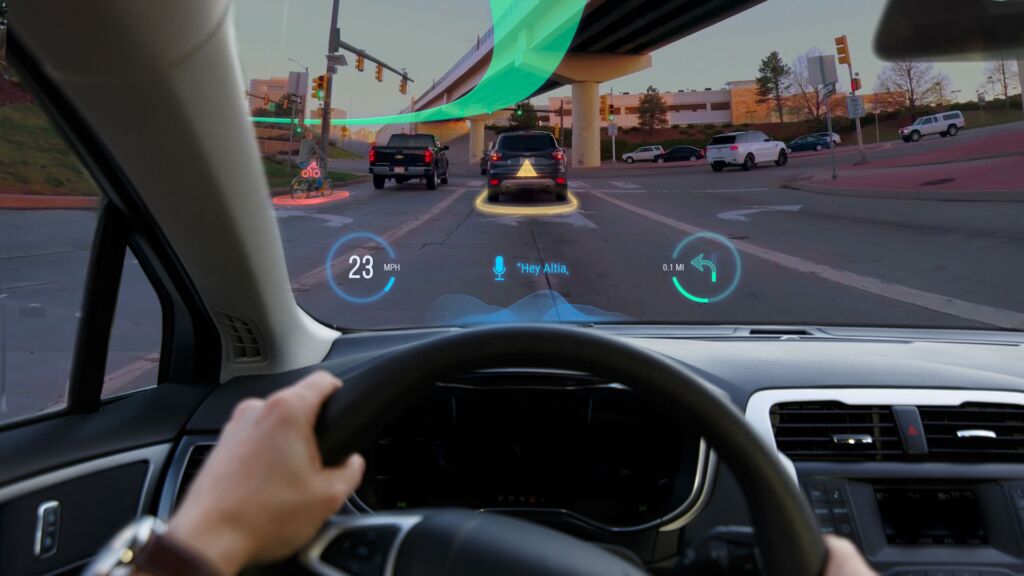
A head-up display (HUD), also called a heads-up display, is a transparent display that shows information in your line of sight so you don’t have to look down. In a car, a HUD projects speed, navigation directions and safety alerts onto the windshield or a small glass panel, so the image appears to float over the road ahead. The name comes from keeping your head up and eyes forward. HUDs started in military aircraft and are now common in cars, with new uses in motorcycles, boats and heavy equipment.
Which cars have head-up displays?
Head-up displays are no longer limited to luxury cars. Many mainstream and luxury brands now offer a HUD, often as part of a higher trim level or technology package, and more electric vehicles are building one into the digital cockpit as standard. The newest systems are augmented reality (AR) HUDs, which line up navigation arrows and safety alerts with the road itself.
Head-up displays beyond the car
Trucks and commercial vehicles
In a 2021 Forbes article, Altia was featured as the expert on the future of HUD because of our integral user-interface software and display systems. Altia CEO, Mike Juran, commented:
“Head-up displays are going to be the third leg to this stool of autonomous driving and EVs…They will be the key to transitioning from driver control to semi-autonomous control. This is important because, if a driver is going to turn over control of the car for a while to read texts, or check e-mail, or doze off, then the car will be able to say, ‘You’d better pay attention now because I’m in a situation I can’t handle.”
Juran went on to clarify the types of information that will be displayed, how graphics will need to appear and how safety is the utmost concern:
“You only want exactly the information you need there, and you’d better be able to see through it. You can’t block the driver’s view. So you need to have semi-transparent graphics that are very minimalist and the most important information. It’s not like a nav screen where you can play a movie or show dog photos.”
HUDs have been on Altia’s project and client lists for a while. In January 2021, Altia Design Research Lab in partnership with Texas Instruments and Ceres showcased a heavy goods electric truck HUD. Autovista Group featured the topic in “Head-up display: gimmick or godsend?”.
Our display featured “advanced driver-assistance system (ADAS) warnings, bridge-height information, battery temperature cautions, front blind-spot detection and turn-by-turn directions.” Juran went on to share his perspective on HUDs in heavy trucks.
“Combining the HUD with the truck is solving one of our bigger problems on the road, as it relates to safety, productivity and driver engagement…If we [focused solely on this and] outfit all of these heavy trucks with HUDs, and then move that into the passenger vehicle space, I think we will have done society a great service.”
Motorcycles and smart helmets
Riders can’t glance down at a dashboard as easily as drivers can, which makes heads-up information especially valuable on two wheels. Helmet-mounted and visor HUDs show speed, turn-by-turn directions, incoming calls and blind-spot alerts without the rider taking their eyes off the road. These displays run on small, battery-powered hardware, so the GUI has to be lightweight, fast and readable in changing light.
Marine
On a boat, the operator is constantly switching between the water ahead and screens for navigation, depth, engine and radar data. A marine HUD brings the most important readings into view, which helps when docking, running at speed or navigating at night. Marine interfaces also have to stay readable in bright sun, glare and spray, which puts a premium on contrast, simple layouts and large, glanceable graphics.
Construction and agriculture equipment
Operators of tractors, combines, excavators and loaders juggle machine status, implement controls and GPS guidance while watching the work in front of them. Head-up displays and transparent overlays can show guidance lines, load and depth readings and safety alerts without pulling attention away from the field or job site. Because this equipment runs long shifts in dust, vibration and bright light, the GUI has to be clear, reliable and fast on rugged embedded hardware.
Head-up display design: what makes a good HUD interface
Good HUD design is mostly about restraint. A head-up display sits on top of the real world, so every graphic competes with the road, the water or the field for the user’s attention. The best HUD interfaces:
- Show only what matters right now: speed, the next turn and urgent alerts, not a full dashboard.
- Use semi-transparent, high-contrast graphics that stay readable in sunlight and at night without blocking the view.
- Keep information at a consistent position and focus distance, so the eye doesn’t have to search or refocus.
- Prioritize alerts clearly, with color and motion reserved for warnings that need action.
- Respond instantly, because a lagging HUD is worse than none.
That last point is also an engineering problem: HUD graphics have to run smoothly on automotive-grade or low-power chips, which is where optimized, production-ready GUI code matters.
Head-Up Display FAQs
What is an AR head-up display?
An augmented reality (AR) head-up display places graphics so they appear to sit on the real world ahead, such as a navigation arrow on the correct lane or a highlight on a pedestrian. Standard HUDs show information at a fixed spot; AR HUDs line it up with what the driver actually sees.
Can motorcycles have head-up displays?
Yes. Motorcycle HUDs are usually built into the helmet or visor, or mounted as a small display near the rider’s line of sight. They show speed, navigation and alerts so riders don’t need to look down at the dashboard.
How are head-up displays used in agriculture and construction?
In tractors, combines and construction machines, HUDs and transparent displays show guidance lines, implement status and safety warnings in the operator’s view, so they can watch the work and the machine data at the same time.
How does Altia help teams build head-up displays?
Altia lets teams design HUD graphics visually in Altia Design or using AI and declarative text with Altia BluePrint, test them on real hardware, and generate optimized production embedded code with DeepScreen. That code runs on automotive-grade and low-power chips, from car HUDs to helmet displays.
Altia’s automotive HMI software powers instrument clusters, head-up displays and digital cockpits in more than 100 million vehicles. See our HUD and cluster demos or get free access to Altia.